News
Software releases, updates and other announcements are published here. An archive of all announcements is available on the News Forum.
You can subscribe to news feeds using a suitable feed reader.
 RSS
RSS ATOM
ATOMReNamer 7.9
ReNamer 7.9 has been released.
This update focuses on improved long file path handling, a significant expansion of the Pascal Script function library, and a number of fixes and refinements throughout the application.
The standout new feature is Long Path support. ReNamer now declares itself as Long Path Aware in its application manifest, and on systems with native long path support enabled, it will handle paths beyond the legacy 260-character Windows limit automatically with no additional configuration. For systems without native long path support, a new "Convert paths to long path specification" option in the settings offers an alternative, automatically prefixing added paths with a special prefix to raise the effective limit to 32,767 characters.
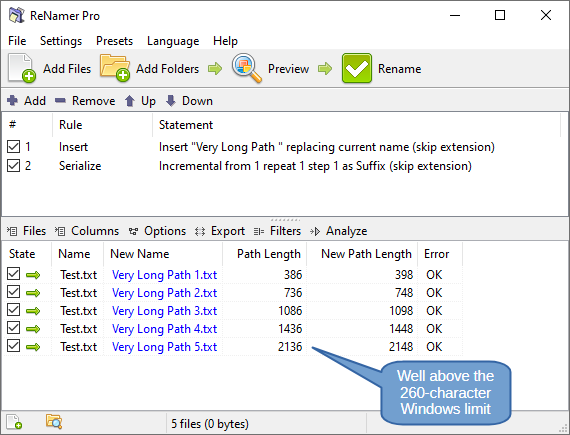
Other changes:
Added new Pascal Script functions for hex encoding, hex decoding, and encoding conversion.
Added many new Pascal Script string array functions: split, join, copy, append, insert, delete, find, and more — making it easier to manipulate collections of strings in custom renaming scripts.
Sub-second timestamps are now extracted from EXIF data, useful for accurately renaming burst photos.
Stricter matching of date/time patterns in the Reformat Date rule to reduce false positives.
Fix: Invalid date/time pattern matches in the Reformat Date rule would cause an error instead of being skipped.
Fix: Marked state did not visually update after marking files by mask.
Fix: An unwanted red rectangle was drawn around the focused cell in the Mapping rule.
Empty file paths are now skipped when importing list files.
General optimizations to the import and export of renaming files.
Added Bulgarian language file. Updated language files: Traditional Chinese, Corsican, Turkish, French, Russian.
For more details see the full changelog between versions 7.8 and 7.9.
ReNamer 7.8
ReNamer 7.8 has been released.
This is another big update that brings several new features and some under-the-hood improvements.
New features:
Implement the Mapping rule. Use this rule to map old filenames to new filenames.
Add an option to export names and new names to clipboard. These can be be loaded directly into a Mapping rule.
Improvements for the Reformat Date rule: Unicode word boundaries, pass-through quoted text in date patterns, improved performance, add ISO date-time formats to the dropdown options.
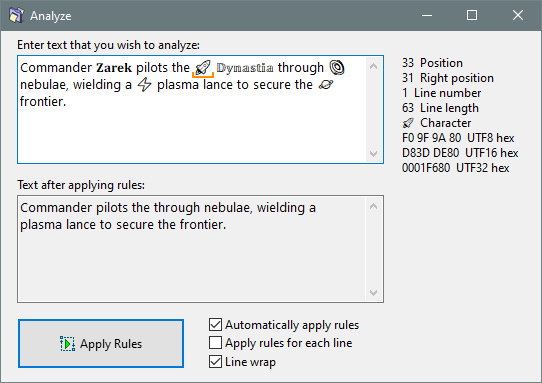
Display detailed information about the character at the caret position in the Analyze window.
The new Mapping rule allows you to map old filenames to new filenames, which can be externally managed and loaded into the rule via clipboard or CSV file. It also allows you to capture the current set of files and their generated new names as a rule set, which could then also be applied to a different set of files.
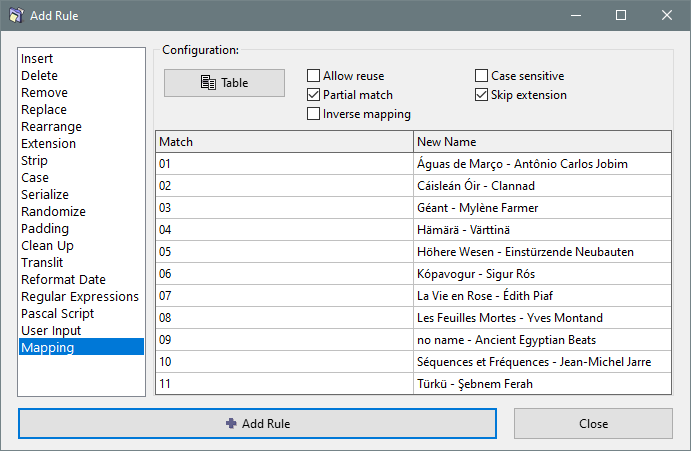
For example, imagine that you have a list of audio files from an album but the filenames contain only the track numbers, and you also have a list of full song titles. With the new Mapping rule you can create a mapping to convert track numbers into to the corresponding full song titles, like shown above.
The improved Analyze dialog can now identify complex Unicode characters. This can be especially useful when dealing with characters that are visually indistinguishable from other characters. Here is a quick demo of how it looks:
Maintenance and other changes:
Optimized implementation of renaming rules.
Fix: The rules list is loosing focus after moving rules. Issue introduced in v7.7.
Gracefully handle errors when generating rule statements. Prevent bogus rule configurations from breaking the main user interface.
Updated language files: French, Turkish, Portuguese (Brazil), Traditional Chinese, Simplified Chinese, Russian.
For more details see the full changelog between versions 7.7 and 7.8.
ReNamer 7.7
ReNamer 7.7 has been released.
This update brings several big features frequently requested by our user community. Let's get to it.
Rule comments displayed in a dedicated column, no longer hiding rule statements.
Rule comments are included in the export of rules to clipboard.
Remove Emoji characters via the Clean Up rule.
Remove Unicode character ranges via the Strip rule.
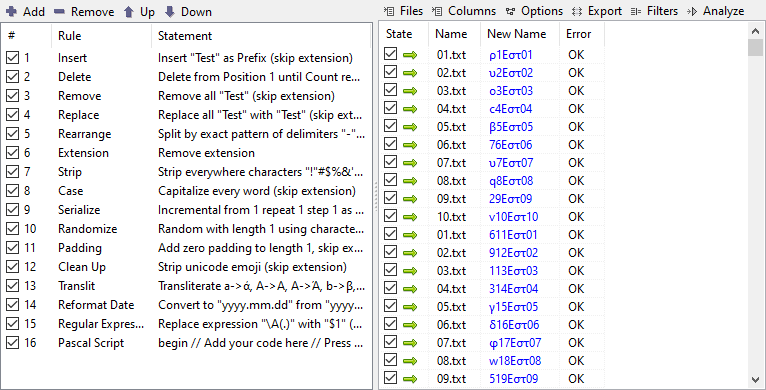
Here is a quick demonstration of some of the new features:
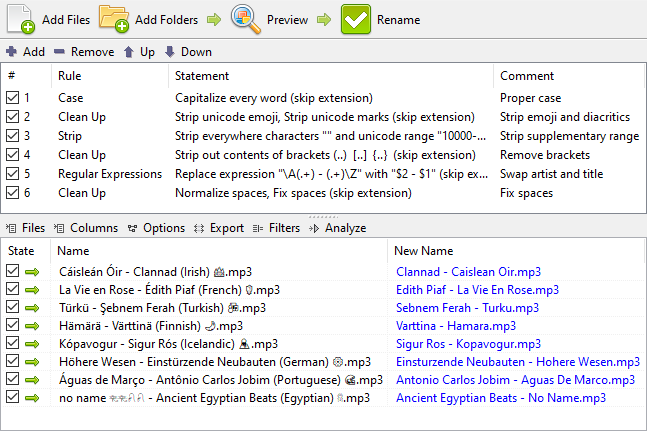
The comments column will automatically appear once you add a comment to any rule.
Another major new feature is the Side-by-Side view mode for rules and files panes. You can toggle the view mode in the settings menu.
The new view mode should let you work comfortably with dozens, and even hundreds, of rules loaded at once.
Other changes include:
Extend the selections of symbols and brackets in the Strip rule to cover the whole ASCII range.
Restore the original behaviour where the first dot at the start of filename is always treated as an extension.
Improve the management of presets and the consistency of the preset status.
Hold CTRL key when loading a preset in the Presets Manager to automatically close the window.
Fix a number of High DPI scaling issues and other inefficiencies.
Updated language files: French, Russian, Traditional Chinese, Turkish.
For more details see the full changelog between versions 7.6 and 7.7.
Shutter 4.8
Shutter 4.8 has been released.
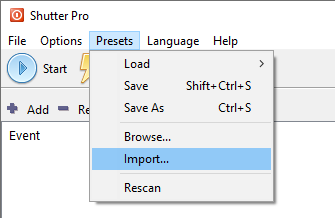
This is a maintenance update that includes improved support of newer platforms and an updated OpenSSL library for the web interface users. Also, importing external presets became easier with a dedicated option found in the main menu, as demonstrated below.
Summary of changes:
Upgraded build environment for improved support of newer platforms and other optimizations.
Added Unicode support for operations with the Windows Registry, e.g. shell integration features.
Added an option to import presets.
Updated OpenSSL library to version 1.1.1w.
Changed OpenSSL library version precedence to load newer versions first.
Updated self-signed SSL certificate with expiry in 2034.
Updated languages: Corsican, French, Simplified Chinese.
See the full changelog between v4.7 and v4.8 for more details.
ReNamer 7.6
ReNamer 7.6 has been released.
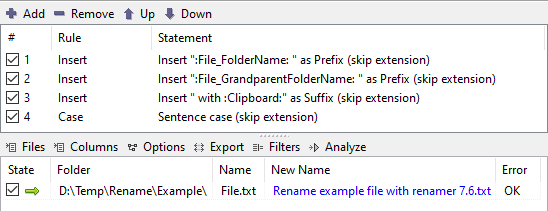
Below is a quick demo of some of the new features, including the use of the grandparent folder name, clipboard content and the new sentence case option.
Summary of changes:
Upgraded build environment for improved support of newer platforms and other optimizations.
Added "Clipboard" meta tag.
Added "Sentence case" option to the Case rule.
Added an option to preserve case during some case changes.
Added meta tags: File_GrandparentFolderName and File_GrandparentFolderPath.
Added string array management functions to Pascal Script: WideConcatStringArrays, WideCopyStringArray, WideAppendStringArray.
Added Unicode support for calling external applications and operations with the Windows Registry.
Updated the Regular Expressions engine with a copy from FPC GIT dated 14 December 2023.
Added language file: Hebrew.
Updated language files: French, Russian, Simplified Chinese, Corsican, Turkish.
See the full changelog between v7.5 and v7.6 for more details.
Colors 3.2
Colors 3.2 has been released.
Summary of changes:
Upgraded build environment for improved support of newer platforms and other optimizations.
Improved system language detection and language override options.
Re-ordered HLS fields into more conventional HSL order.
Added language files: German.
Updated language files: Corsican.
See the full changelog between versions 3.1 and 3.2 for more details.
RandPass 2.2
RandPass 2.2 has been released.
Summary of changes:
Upgraded build environment for improved support of newer platforms and other optimizations.
Improved system language detection and language override options.
Added language files: Hebrew, Spanish, Simplified Chinese.
Updated language files: Corsican, Turkish, Japanese.
See the full changelog between versions 2.1 and 2.2 for more details.
Hasher 4.2
Hasher 4.2 has been released.
Summary of changes:
Upgraded the build environment for improved support of newer platforms and other optimizations.
Updated language files: Corsican, German, Russian, Turkish.
See the full changelog between versions 4.1 and 4.2 for more details.
Resizer 2.2
Resizer 2.2 has been released.
Summary of changes:
Upgraded the build environment for improved support of newer platforms and other optimizations.
Improved the identification of the system language and the options for overriding it.
Added Simplified Chinese, Korean and German language files.
Updated Japanese and Corsican language files.
See the full changelog between versions 2.1 and 2.2 for more details.
Shutter 4.7
Shutter 4.7 has been released.
Summary of changes:
Added an event for detecting the full screen mode.
Unicode support for retrieving the logged in user name, enumerating processes and killing processes.
Replaced time input controls. Avoid potential negative values.
Replaced numeric input controls. Offer a greater range of values.
Updated the OpenSSL library to version 1.1.1u.
Restore base compatibility with Windows 2000.
Added Turkish language file. Thanks to Yusuf Can Özdemir.
Updated Italian, French and Russian language files.
See the full changelog between v4.6 and v4.7 for more details.
View more news